Minimal rotary watch face for Wear OS smartwatches
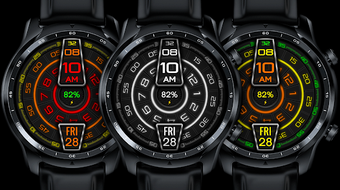
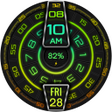
UNDOROTARY Watch face by Sakib it is a minimalist Wear OS face that replaces traditional numerals with a rotary-style time presentation for users who prefer a pared-back look. It renders time with rotating hour and minute indicators, exposes configurable complication slots, offers multiple color themes, and uses an optimized Always-On Display to reduce battery draw. The design targets Wear OS owners who want a distinctive, low-clutter wrist display that still surfaces glanceable data.
What the face changes about how time is shown
UNDOROTARY converts conventional digits into rotating indicators, using the developer's described "Undo Rotary" animation to mark hour and minute progression. The face supplies high-resolution artwork crafted for circular screens, which keeps the layout visually compact without extra UI chrome. This approach shifts emphasis from numeric readouts to motion-based cues, a deliberate aesthetic choice aimed at users who prefer typographic minimalism over dense numerical displays.
How deep the look and data customization goes
The app exposes configurable complication slots so users can add glanceable data to the minimalist canvas. Complication examples include:
- battery percentage
- step count
- heart rate
Multiple color themes are available and the face integrates with Wear OS customization menus, letting users assign complications or change palette choices by long-pressing the active face and using the watch's edit interface.
Whether it affects battery life or system responsiveness
UNDOROTARY includes an Always-On Display mode specifically optimized to limit power draw while preserving time visibility, and the developer positions the build as lightweight for better battery longevity. Graphics are tailored for circular displays so the face avoids rendering unnecessary off-circle pixels. These choices reduce continuous GPU and display workload compared with more complex animated wallpapers or video backgrounds.
How easy installation and compatibility behave on modern watches
Installation requires adding the watch face on the watch itself via the Play Store and, if needed, manually selecting it from the watch faces list. The face targets Wear OS devices running API Level 28 and later, including recent Galaxy Watch 4, 5, and 6 models plus Google Pixel Watch series; it does not run on Tizen-based models such as the Galaxy Watch 3. The face is built by an independent developer who uses Watch Face Studio for the build.
A targeted pick for style-focused Wear OS users
UNDOROTARY is a distinct option for Wear OS owners who favor minimalist typography and a singular wrist identity, and its lightweight construction suits daily wear. One practical limitation is the device requirement to recent Wear OS versions (API Level 28+), which excludes certain older and Tizen-based watches. Check device compatibility in the Play Store before installing to confirm it runs on your watch.